Showing posts with label knowledge graph. Show all posts

Tuesday, 4 December 2012

Get smarter answers from the Knowledge Graph from Português to 日本語 to русский

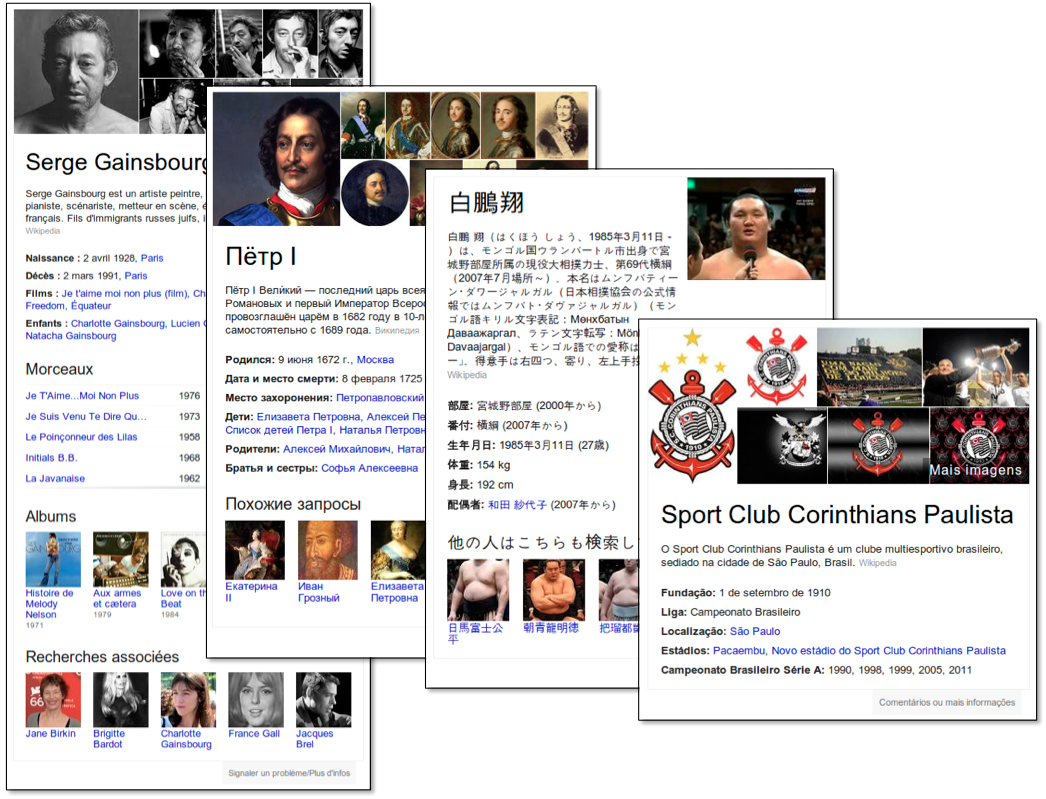
Over the next few days, when you search in Spanish, French, German, Portuguese, Japanese, Russian, or Italian, you’ll start seeing new answers from the Knowledge Graph -- our project to map out real-world things as diverse as movies, bridges and planets. You can now quickly and easily discover new information relevant to your language and country.

So in Japanese, your search for [白鵬] will bring up the top-ranked sumo wrestler, including his heya and ranks, and help you discover other highly-ranked sumo wrestlers. Or a Russian search for [петр I] will help you research the country’s historic Tzar Peter the Great, and explore connections to his family and other famous rulers. And if you’re a fan of football in Brazil, [corinthians] will show information including that team’s most recent championship wins -- all in your language.


This is more than just translation. The Knowledge Graph needs to account for different meanings of the same word -- “football” means something quite different in the U.S. than in Europe. It also needs to recognize what's most important in a particular region. The graph now covers 570 million entities, 18 billion facts and connections, and about three times as many queries globally as when we first launched it -- we’ll keep working on making it more useful for you.

Posted by Aaron Brown, Senior Product Manager, Search

Friday, 30 November 2012

Look up medications more quickly and easily on Google

We get a lot of queries for medicine on Google. So to make it quick and easy for you to learn about medications, we’ll start showing key facts -- side effects, related medications, links to in-depth resources, and more -- right on the search results page.


This data comes from the U.S. FDA, the National Library of Medicine, and the Department of Veterans Affairs, among others. It’s part of the Knowledge Graph -- our project to map out billions of real-world things, from famous artists to roller coasters to planets (and now medications). We hope you find this useful, but remember that these results do not act as medical advice.

Posted by Aaron Brown, Senior Product Manager, Search

Friday, 19 October 2012

“People also search for” -- now with explanations!

Search is a lot about discovery, and the Knowledge Graph, our map of real-world people, places and things, is designed to help you find new information easily. Have you ever flipped through the “People also search for” section of the Knowledge Graph panels and wondered -- just how are those two people connected anyway? People had fun with our Bacon Number calculator, which revealed some, often surprising, connections, and now we’re taking it one step further. Just mouse over or click on a thumbnail to see an explanation of how it’s connected to the subject of your search:


“People also search for” movies for Gone with the Wind

We’re starting by showing major co-starring roles between actors, movies, and TV shows as well as highlighting family connections amongst famous people in the Knowledge Graph. These connections won’t show up all the time, but when there is an interesting explanation available, you can now see it at a glance. Happy browsing!

Wednesday, 5 September 2012

Explore with the Knowledge Graph carousel in English globally

Last month, we showed how you can now get answers to your questions with the help of the Knowledge Graph even when the best answer is not just a single person or thing, but a collection or list of items. When looking for [cedar point rides], you see a carousel of popular roller coasters at the amusement park, drawing on our Knowledge Graph and the collective intelligence of the Web. The feature was initially available in English on google.com, and we’re now taking our first steps to make it available more widely around the world. Over the next couple days, we’ll begin showing the carousel for factual lists to our English users on all Google domains across the world.


This works for a variety of locally interesting lists like [aamir khan movies], [cast of the it crowd] or [mountains of the alps] or more general queries like [saturn’s moons] or [dog breeds]. The carousel makes it easy to explore the items in the list -- it stays attached to the top of the search results page so you can flip through the items easily and dive in deeper if something catches your interest. Happy exploring!

Posted by Kavi Goel, Product Manager

Wednesday, 16 May 2012

Introducing the Knowledge Graph: things, not strings

Cross-posted from the Official Google Blog

Search is a lot about discovery—the basic human need to learn and broaden your horizons. But searching still requires a lot of hard work by you, the user. So today I’m really excited to launch the Knowledge Graph, which will help you discover new information quickly and easily.

Take a query like [taj mahal]. For more than four decades, search has essentially been about matching keywords to queries. To a search engine the words [taj mahal] have been just that—two words.

But we all know that [taj mahal] has a much richer meaning. You might think of one of the world’s most beautiful monuments, or a Grammy Award-winning musician, or possibly even a casino in Atlantic City, NJ. Or, depending on when you last ate, the nearest Indian restaurant. It’s why we’ve been working on an intelligent model—in geek-speak, a “graph”—that understands real-world entities and their relationships to one another: things, not strings.

The Knowledge Graph enables you to search for things, people or places that Google knows about—landmarks, celebrities, cities, sports teams, buildings, geographical features, movies, celestial objects, works of art and more—and instantly get information that’s relevant to your query. This is a critical first step towards building the next generation of search, which taps into the collective intelligence of the web and understands the world a bit more like people do.

Google’s Knowledge Graph isn’t just rooted in public sources such as Freebase, Wikipedia and the CIA World Factbook. It’s also augmented at a much larger scale—because we’re focused on comprehensive breadth and depth. It currently contains more than 500 million objects, as well as more than 3.5 billion facts about and relationships between these different objects. And it’s tuned based on what people search for, and what we find out on the web.

The Knowledge Graph enhances Google Search in three main ways to start:

1. Find the right thing
Language can be ambiguous—do you mean Taj Mahal the monument, or Taj Mahal the musician? Now Google understands the difference, and can narrow your search results just to the one you mean—just click on one of the links to see that particular slice of results:

This is one way the Knowledge Graph makes Google Search more intelligent—your results are more relevant because we understand these entities, and the nuances in their meaning, the way you do.

2. Get the best summary
With the Knowledge Graph, Google can better understand your query, so we can summarize relevant content around that topic, including key facts you’re likely to need for that particular thing. For example, if you’re looking for Marie Curie, you’ll see when she was born and died, but you’ll also get details on her education and scientific discoveries:

How do we know which facts are most likely to be needed for each item? For that, we go back to our users and study in aggregate what they’ve been asking Google about each item. For example, people are interested in knowing what books Charles Dickens wrote, whereas they’re less interested in what books Frank Lloyd Wright wrote, and more in what buildings he designed.

The Knowledge Graph also helps us understand the relationships between things. Marie Curie is a person in the Knowledge Graph, and she had two children, one of whom also won a Nobel Prize, as well as a husband, Pierre Curie, who claimed a third Nobel Prize for the family. All of these are linked in our graph. It’s not just a catalog of objects; it also models all these inter-relationships. It’s the intelligence between these different entities that’s the key.

3. Go deeper and broader
Finally, the part that’s the most fun of all—the Knowledge Graph can help you make some unexpected discoveries. You might learn a new fact or new connection that prompts a whole new line of inquiry. Do you know where Matt Groening, the creator of the Simpsons (one of my all-time favorite shows), got the idea for Homer, Marge and Lisa’s names? It’s a bit of a surprise:

We’ve always believed that the perfect search engine should understand exactly what you mean and give you back exactly what you want. And we can now sometimes help answer your next question before you’ve asked it, because the facts we show are informed by what other people have searched for. For example, the information we show for Tom Cruise answers 37 percent of next queries that people ask about him. In fact, some of the most serendipitous discoveries I’ve made using the Knowledge Graph are through the magical “People also search for” feature. One my favorite books is The White Tiger, the debut novel by Aravind Adiga, which won the prestigious Man Booker Prize. Using the Knowledge Graph, I discovered three other books that had won the same prize and one that won the Pulitzer. I can tell you, this suggestion was spot on!

We’ve begun to gradually roll out this view of the Knowledge Graph to U.S. English users. It’s also going to be available on smartphones and tablets—read more about how we’ve tailored this to mobile devices. And watch our video (also available on our site about the Knowledge Graph) that gives a deeper dive into the details and technology, in the words of people who've worked on this project:


We hope this added intelligence will give you a more complete picture of your interest, provide smarter search results, and pique your curiosity on new topics. We’re proud of our first baby step—the Knowledge Graph—which will enable us to make search more intelligent, moving us closer to the "Star Trek computer" that I've always dreamt of building. Enjoy your lifelong journey of discovery, made easier by Google Search, so you can spend less time searching and more time doing what you love.

The Knowledge Graph for mobile and tablet search

Have you ever had a question pop into your head at an unexpected time? Maybe when you’re talking with a friend over lunch, watching TV at home, or reading a magazine on the bus? On smartphones and tablets Google is great for these types of situations because it puts the information of the entire web at your fingertips. Today, we’re making it even faster and easier to get answers and explore no matter where you are, with the launch of the Knowledge Graph on desktop, smartphones, and tablets.

On wireless networks and on small screens, every page load and every pixel matters when it comes to speed and ease-of-use. So we strive for efficiency and try to make the most of touch-based interactions when integrating information from Knowledge Graph into our mobile and tablet search experiences.

For example, say this fall I’m heading to Chicago for a friend’s wedding, and I’ve heard I should check out Millennium Park while I’m in town. A quick search on Google brings up Knowledge Graph information embedded within the results. This initial peek shows what people are often interested in about Millennium Park.


Tapping or swiping on the content from the Knowledge Graph instantly shows me more useful information. I can see if there’s an event going on while I’m in town, and get some ideas for other Chicago attractions I might want to visit based on what other people have searched for on Google.


When searching on my tablet, I can swipe the rows of images to explore more related content.

Now let’s take another example. Say I’m searching for [andromeda], which could be the galaxy, the TV series, or the Swedish band. The Knowledge Graph distinguishes between each of these meanings and shows me an interactive ribbon at the top of the search results that I can swipe and tap to select just what I’m looking for. That means less typing.


These features are currently rolling out to most Android 2.2+ and iOS4+ devices. On Android, the feature is available through Google in the browser and the Quick Search Box. On iOS, the feature is available in the browser and will be coming soon to the Google Search App.